Free resource
Claude Code Status Line Setup: Track Your Context in Real Time
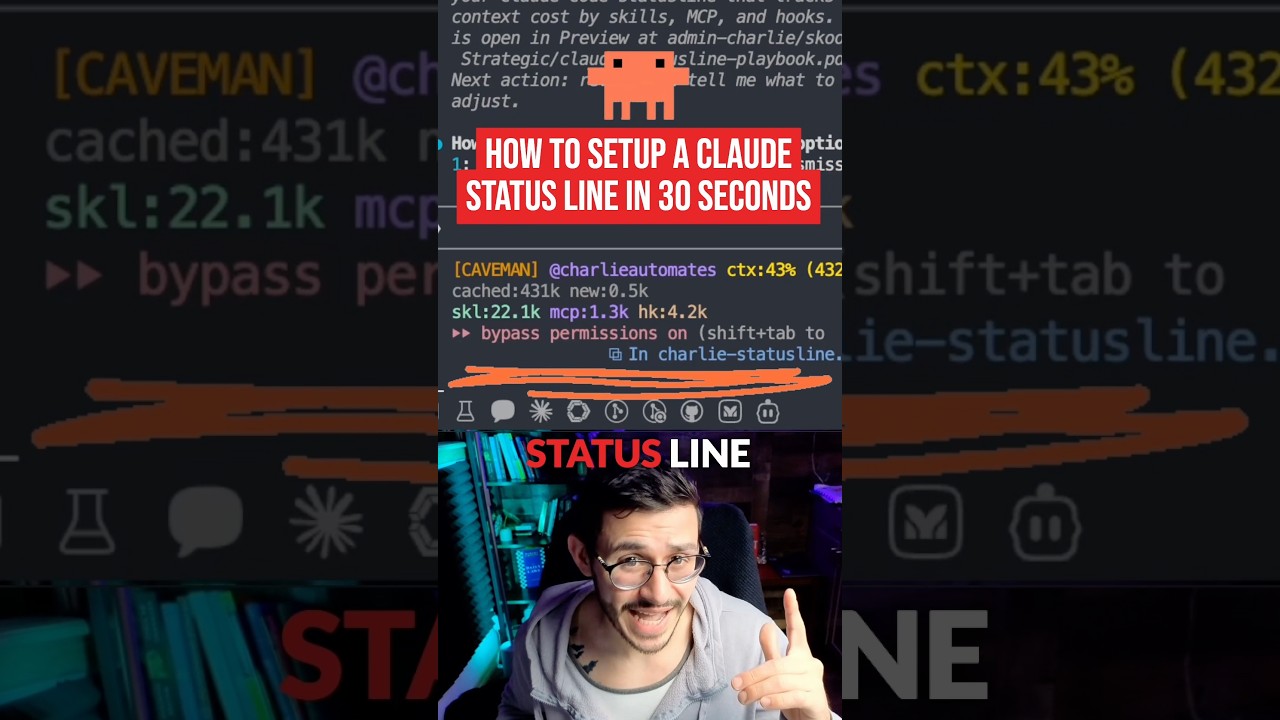
The Claude Code status line in this playbook drops one Python file into your ~/.claude/hooks/ folder, wires three lines into settings.json, and shows you what your context is costing at the bottom of every session. You see total context usage, your prompt cache split, and the token cost of skills, MCP servers, and hooks. The video and the playbook PDF walk you through it.
Claude Code is the application. Your workspace is the operating system. If the OS is garbage, no model saves you. Better prompts will not fix it. A bigger model will not fix it either.
This drops one Python file into your ~/.claude/hooks/ folder, wires three lines into settings.json, and gives you a live statusline at the bottom of every session that breaks down exactly what your context is costing you.
What you'll see at the bottom of every session
ctx:N% (Nk)— total context window usage, color-coded as it fillscached:Nk new:Nk— prompt cache split. When new spikes, your cache broke.skl:Nk mcp:Nk hk:Nk— token cost from each context source. Skills, MCP servers, hook outputs.
What's in the playbook PDF
- 3-step install (no pip, no env vars, no node modules)
- Full Python script ready to paste, ~265 lines, stdlib only
- Customization callouts: change the @charlieautomates tag to your handle, optional caveman badge, repo marker
- Full breakdown of how to read every number on the statusline
- How to diagnose a broken cache and what to trim when one category gets heavy
About the [CAVEMAN] badge
If you've seen [CAVEMAN] on the statusline in any of my posts, that's a separate plugin I run that compresses Claude's communication style. It's optional. The PDF shows you exactly how to delete the caveman block if you don't use that plugin, so the script works clean either way.