Get your next client on autopilot
Inside AI Autopilot Academy you get my 27-day Claude Code mastery program with a 1-click install setup file, so you’re up and running on day one. Plus my GoHighLevel CLI, the Skool Automation MCP and Jarvis +. And you get a proven Claude Code content system to get your next client on autopilot.
If you switched Claude Code to Fable 5.2 the day it dropped and hit your Claude usage limits two days later, welcome to the club.
Anthropic says it straight in the Claude Help Center: “Fable models use your usage limits faster than other Claude models.” Fable is the smartest model you can run in Claude Code right now. It’s also the fastest way to lock yourself out until your limits reset.
I’m Charles J Dove, I run Charlie Automates, and there’s a setup that gets you Fable’s brain on the hard parts without paying Fable prices on every edit. It’s 4 commands. Here’s the whole thing, plus what Fable actually caught when I tested it.
Why Does Fable 5.2 Use Claude Usage Limits So Fast?
Fable 5.2 uses Claude usage limits faster because it’s a premium model. On the API it costs $8 per million input tokens and $40 per million output tokens, exactly 2x Opus 5.5 at $4 / $20. On a Claude plan you don’t see that price. You see it as your usage bar filling up faster.
Fable also thinks longer per turn. Thinking is always on, and single requests on hard tasks can run for many minutes. Every one of those minutes counts against your limit.
So running Fable as your default model is like hiring a senior engineer to rename your variables. They’ll do it perfectly. You’ll just run out of budget by Wednesday.
What Is the Claude Code Advisor?
The Claude Code advisor is a second model that checks your main model’s work at the hard moments. Your main model does the building. The advisor reads the whole conversation and steps in when the work gets hard, like before a big plan starts or before the job gets called done.
That’s the trick to Claude usage limits with Fable. Opus 5.5 does most of the typing at Opus prices. Fable 5.2 only spends tokens when its judgment actually matters.
One rule: the advisor has to be at least as strong as the main model. Fable can advise Opus. Opus can’t advise Fable.
| Main model (builder) | Advisor | When to use it |
|---|---|---|
| Sonnet 5.5 | Fable 5.2 | Cheapest way to get Fable’s judgment |
| Opus 5.5 | Fable 5.2 | The setup I run every day |
| Fable 5.2 | Fable 5.2 | Max quality, max usage. Rarely worth it |
How Do You Set Up Fable as Your Advisor in Claude Code?
Setting up Fable as your advisor takes 4 steps in Claude Code. I ran every one of these on Claude Code version 2.1.322.
Step 1: Unlock Fable once. Open your terminal, start Claude Code by typing claude, then type /model fable and press Enter. On some plans Fable costs extra, so Claude Code asks you to OK usage credits one time. Pick continue. If it doesn’t ask, you’re already set.
Step 2: Make Opus the builder. Type /model opus and press Enter. Look for “Set model to Opus 5.5 and saved as your default for new sessions.” Every new chat starts on Opus now. You never repeat this.
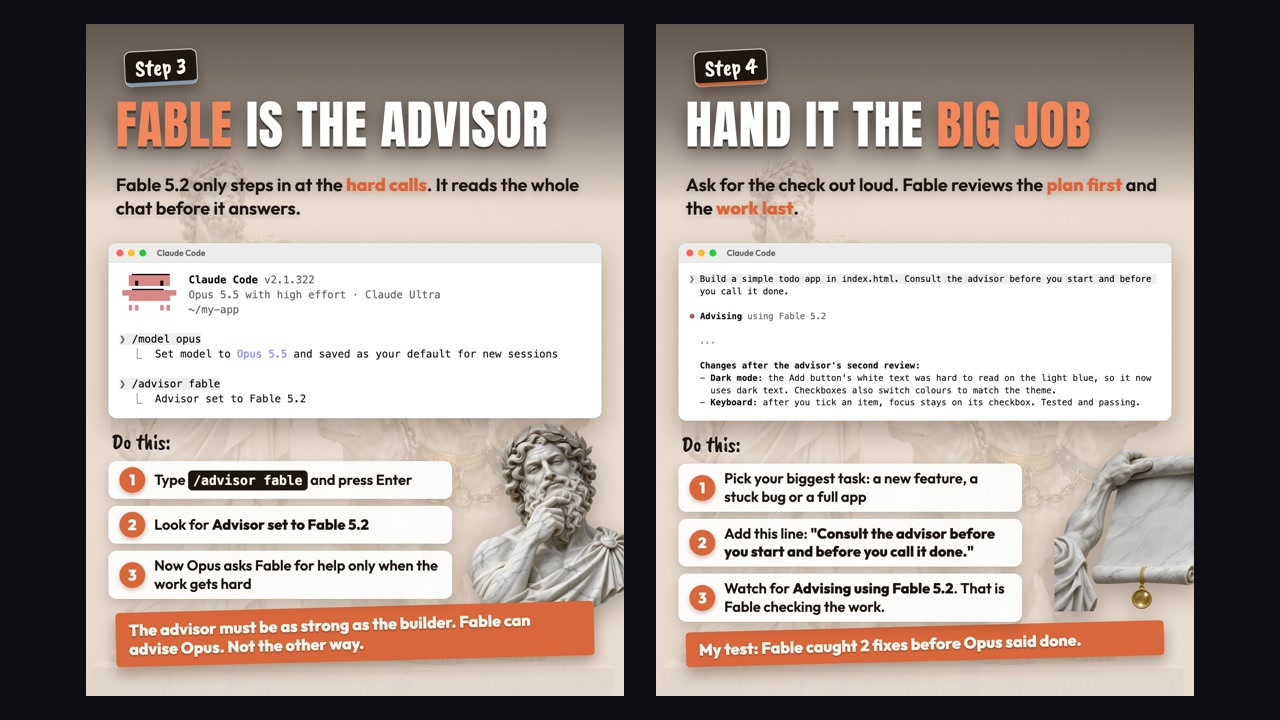
Step 3: Make Fable the advisor. Type /advisor fable and press Enter. Look for “Advisor set to Fable 5.2.” Now Opus asks Fable for help only when the work gets hard. If you change the advisor in the middle of a chat, it kicks in after /clear or /compact.
Step 4: Hand it the big job, and ask for the check out loud. Pick your biggest task, a new feature, a stuck bug or a full app, and add this line to your prompt:
Consult the advisor before you start and before you call it done.
Watch for “Advising using Fable 5.2” in the chat. That’s Fable checking the work.
What Did the Fable Advisor Actually Catch?
The Fable advisor caught 2 real problems in my test before Opus called the job done. I gave Opus a small job: “Build a simple todo app in index.html. Consult the advisor before you start and before you call it done.”
Opus built the app. Then Fable reviewed it a second time and Opus made these changes:
- Dark mode contrast. The Add button had white text on a light blue background, which was hard to read. It switched to dark text, and the checkboxes now change colors to match the theme.
- Keyboard focus. After you tick an item, the focus now stays on its checkbox, so keyboard users don’t lose their place. Tested and passing.
Neither one would’ve broken the app. Both are the kind of thing a client notices on the first demo. That’s exactly where you want Fable’s tokens going: the final check, not the first draft.
How Do You Turn the Advisor Off or Use It for One Session?
Turn the Claude Code advisor off by typing /advisor off. Your main model keeps working on its own from there.
If you only want Fable’s help for one session, start Claude Code with the --advisor flag instead of /advisor. It applies to that session only and doesn’t change your saved settings.
How Do You Check Your Claude Usage Limits?
Check your Claude usage limits in Settings, then Usage. The Help Center also points out that Fable has its own reset you can use if you run out of Fable usage before the week is over.
If the bar is filling up faster than you’d like, save the advisor for your hardest tasks and let Opus run solo on everything else.
And if you want to cut usage on the boring work too, push repetitive jobs into skills that run on cheaper models. My Jev skill ran 216 emails for 1 cent against $4.73 on Opus.
Key Takeaways
- Fable 5.2 drains Claude usage limits faster than other models. It costs 2x Opus 5.5 per token.
- Opus builds, Fable advises.
/model opus, then/advisor fable. - Unlock Fable once with
/model fable. Some plans ask you to OK usage credits. - Ask for the check out loud: “Consult the advisor before you start and before you call it done.”
- In my test, Fable caught 2 fixes (dark mode contrast and keyboard focus) before Opus said done.
/advisor offturns it off.--advisoruses it for one session only.- Watch Settings > Usage, and use the Fable reset if you run out early.
If you’re still deciding which model belongs where, I compared them side by side in Fable vs Opus: Claude Fable 5.2 or Opus 5.5 in Claude Code. The advisor is one piece of a bigger setup, and the rest is in the 3-step system to build an agentic OS.
Where to Go From Here
Get your next client on autopilot.
Join AI Autopilot Academy for my 27-day Claude Code mastery program with a 1-click install setup file, plus a proven Claude Code content system to get your next client on autopilot.
Members get my full Fable 5.2 token setup inside the Academy. It’s the same advisor flow we use on client builds at my agency CC Strategic. New tests drop every week on the Charlie Automates YouTube channel @charlieautomates, and the free tools live on charlieautomates.com.
FAQ
Why do I keep hitting my Claude usage limit?
The most common reason is running Fable as your default model. The Claude Help Center says Fable models use your usage limits faster than other Claude models. Make Opus 5.5 your main model with /model opus and keep Fable as the advisor with /advisor fable.
What does /advisor do in Claude Code?
/advisor sets a second model that reviews your main model’s work at the hard moments, like before a plan starts and before a task is called done. The advisor must be at least as capable as the main model, so Fable 5.2 can advise Opus 5.5 but not the other way around.
Does the Claude Code advisor use fewer tokens than running Fable directly? Yes. The main model does most of the work at its own price, and Fable only spends tokens when the advisor is consulted. How much you save depends on how often the advisor gets called, so ask for the check at the start and the end of big jobs instead of every step.
How do I turn off the advisor in Claude Code?
Type /advisor off. To use an advisor for one session only without saving it, start Claude Code with the --advisor flag.